Master Your Content: A Social Media Planner for Creators
For anyone managing a brand, a business, or a creative portfolio, the digital landscape can feel chaotic. Between scripting YouTube videos, designing Instagram carousels, and remembering the login credentials for a dozen different platforms, the administrative side of content creation often overwhelms the creative process. This is where a structured approach to organization becomes essential. I would like to present to you a curated collection of mini social media planner templates designed to bring order to that chaos. This isn't just a generic notebook; it is a specialized set of design assets intended to streamline your workflow, whether you prefer the tactile feel of paper or the efficiency of digital tools.
Anatomy of the Mini Social Media Planner Collection
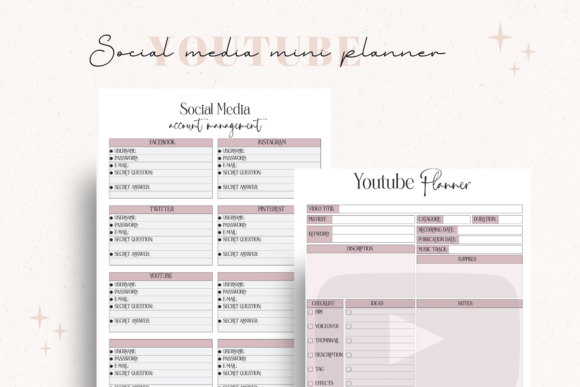
When we talk about "planning" in the context of modern marketing, we are often referring to two distinct phases: the creative strategy and the technical management. This collection addresses both with a minimalist, functional aesthetic. It avoids the clutter of unnecessary graphics, focusing instead on clean lines and ample white space. This visual personality ensures that the planner serves as a neutral canvas for your ideas, fitting seamlessly into a wide variety of brand identities without clashing with your existing visual language.
The collection includes two distinct components. The first is the YT Film Planner. Video content requires a specific hierarchy of organization—hook, body, call to action—that differs from static image posting. This planner provides a structured layout for mapping out your video scripts, ensuring you hit every necessary narrative beat before you hit record. The second component is the Social Media Password Tracker. In an era of heightened security, relying on browser autofill is risky. This tracker offers a secure, offline method for managing your credentials, keeping your access points organized and safe.
Practical Application: Print vs. Digital
One of the most significant advantages of this set is its versatility regarding the medium. The files come in three distinct formats, allowing you to integrate them into your specific workflow. You are not locked into a single method of usage.
- PDF Files: These are optimized for instant printing. If you are a tactile planner who prefers pen and paper, these files are ready to go. The layout is designed to be printer-friendly, ensuring that the ink usage remains economical while maintaining high contrast for readability.
- AI (Adobe Illustrator) Files: For the designer or brand strategist who needs total control, the AI files are invaluable. This is where the "mini planner" becomes a "custom planner." You can open these files in Adobe Illustrator to modify the typography, adjust the color palette to match your brand identity, or resize the grid systems. This flexibility allows you to create a cohesive stationery set that aligns perfectly with your brand guidelines.
- JPG Files: These are perfect for digital use. You can import these images into apps like GoodNotes, Notability, or Procreate on your tablet. This allows you to write directly on the planners using a stylus, combining the satisfaction of handwriting with the convenience of digital organization.
Visual Hierarchy and Brand Consistency
As a creative professional, I often emphasize the importance of visual hierarchy in design assets. A well-designed planner utilizes grid systems to guide the eye. In this collection, the spacing between fields is deliberate. It prevents the "crowded" feeling that often plagues digital planning tools. When you use a planner with strong typographic structure, your own handwriting or digital text benefits from that underlying order. It creates a sense of professionalism, even in your private notes.
For entrepreneurs and small business owners, maintaining brand consistency extends beyond your public-facing website. It includes your internal tools. By using the customizable AI files to adapt this social media planner to your brand colors, you reinforce your brand identity in every aspect of your daily routine. It is a subtle psychological shift: when your tools look professional, your planning process feels more authoritative.
Streamlining the Content Creation Workflow
The primary value of a social media planner lies in its ability to reduce cognitive load. When you sit down to create content, you should be focusing on the message, not the logistics. The YT Film Planner specifically aids in this by providing a dedicated space for metadata—titles, tags, and descriptions—which are often left as afterthoughts. By planning these elements alongside the video content, you ensure a more SEO-friendly approach to your publishing schedule.
Furthermore, the inclusion of the Password Tracker acknowledges the reality of modern digital management. Security is a non-negotiable aspect of running a business online. Having a dedicated, printable tracker ensures that you can manage access for team members or clients without the friction of constant password resets. It is a practical solution to a common administrative headache.
Ideal Use Cases and Audience Fit
This collection is particularly effective for a broad audience range, from the hobbyist crafter documenting their process to the serious marketer managing multiple client accounts.
- For Bloggers and Publishers: Use the planner to schedule editorial calendars and track the visual assets required for each post.
- For Content Creators: The YT planner is essential for scripting and storyboarding, ensuring that video production is efficient.
- For Small Business Owners: The password tracker is a lifesaver for keeping track of various vendor portals and social accounts securely.
The "mini" nature of the planners makes them unobtrusive. They can be tucked into a standard planner binder or used as a standalone digital notebook page. This modularity is key to a flexible organizational system.
Conclusion
Effective content creation is as much about organization as it is about inspiration. This mini social media planner collection offers a functional, aesthetically pleasing solution to the daily grind of digital management. With the ability to print, customize, or use digitally, it adapts to your needs rather than forcing you to adapt to it.
I encourage you to explore how these tools can fit into your workflow. For those interested in further expanding their toolkit, I invite you to join our newsletter. You will receive weekly freebies and updates on new design assets. Simply copy and paste this link into your browser to sign up: bit.ly/AnetaDesignStore.
Thank you for visiting and supporting independent design. Your purchase allows us to continue creating tools that empower creators like you.
Aneta & Filip